Run your SAS code in Databricks on Jenner
No SAS license required.
Jenner is an independent engine for the SAS language. It runs your DATA steps, PROCs and macros inside your Databricks workspace, on your Unity Catalog tables: in notebooks next to Python, in jobs, and in Jenner Studio.
Can SAS code run in Databricks?
Yes, with Jenner. Install the Jenner package from a Unity Catalog volume, load it in a notebook, and put SAS code in a %%jenner cell next to your Python and SQL cells. Name the tables the program reads with --in and the tables it writes with --out. The same program can also run as a task in a Databricks job.
The language does not need translating. Most programs do need their file and library paths pointed at Databricks locations, because a program that reads /sasdata/sales has to be pointed at a volume or a table instead.
SAS and Python in the same notebook
Start a cell with %%jenner and write SAS. The cells around it stay Python or SQL, and they share data through Unity Catalog tables and Spark views.
Load Jenner once
One line at the top of the notebook loads the Jenner package.
%load_ext jenner_dbxWrite SAS in a %%jenner cell
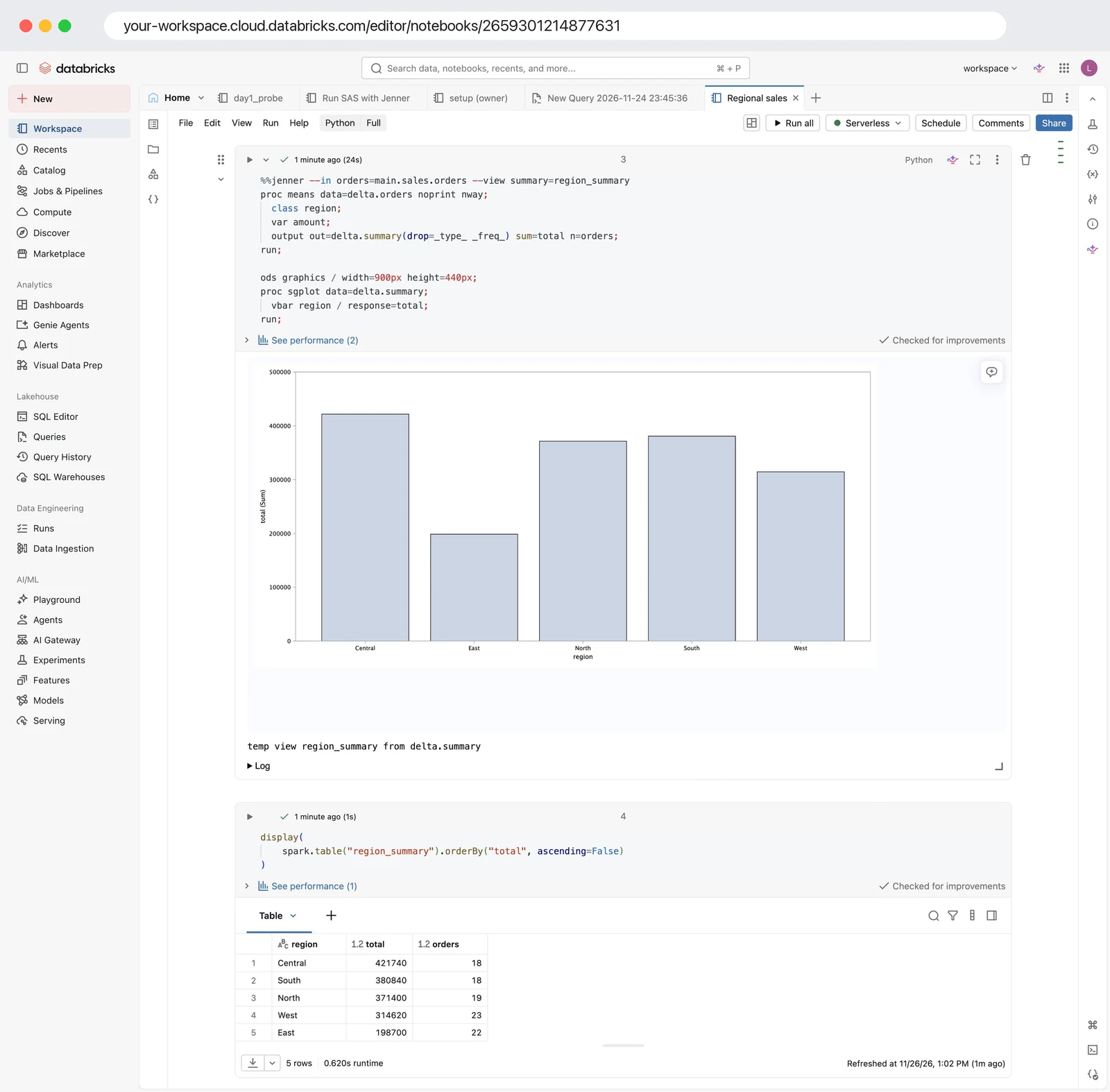
--in names the Unity Catalog table the program reads. --view gives a result to Spark as a temporary view. The listing, tables and charts appear under the cell.
%%jenner --in orders=main.sales.orders --view summary=region_summary
proc means data=delta.orders noprint nway;
  class region;
  var amount;
  output out=delta.summary(drop=_type_ _freq_) sum=total n=orders;
run;

ods graphics / width=900px height=440px;
proc sgplot data=delta.summary;
  vbar region / response=total;
run;
Carry on in Python
The next cell reads that view as a Spark DataFrame. Nothing is exported and nothing is copied by hand.
display(
    spark.table("region_summary").orderBy("total", ascending=False)
)
What runs, and where
Jenner is one engine. In Databricks it runs on your serverless compute, under your Unity Catalog permissions.
In a notebook
Put a SAS program in a %%jenner cell. The listing and the log appear below the cell, and WORK data sets carry over from one cell to the next for the rest of the session.
As a job
Run a .sas file as a task in a Databricks job with the jenner-run entry point, on the schedules you already use. Each run keeps its program, log and listing in a run folder on a volume.
In Jenner Studio
Open the Jenner Studio App for process flows, a program editor, task windows and notebooks. It runs in the browser, and you sign in with your Databricks account.
On your Unity Catalog tables
--in reads a table, or a temporary view of a DataFrame, as a SAS data set. --out writes a data set to a Delta table: it replaces the rows, appends them, or refuses if the table exists. Columns keep the table's types, and nothing is cast silently.
Output on your volumes
A permanent SAS library is kept as Parquet files on a Unity Catalog volume. Each run's program, log, listing and output files are copied to the user's own storage on a volume, so they outlast the serverless machine.
DATA steps, PROC SQL, macros and 100 procedures
It is the same engine that runs on Linux, macOS and Windows, packaged for Databricks. Procedures that need R cannot run on serverless compute, which has no R; they stop with a clear error.
Jenner Studio, inside your workspace
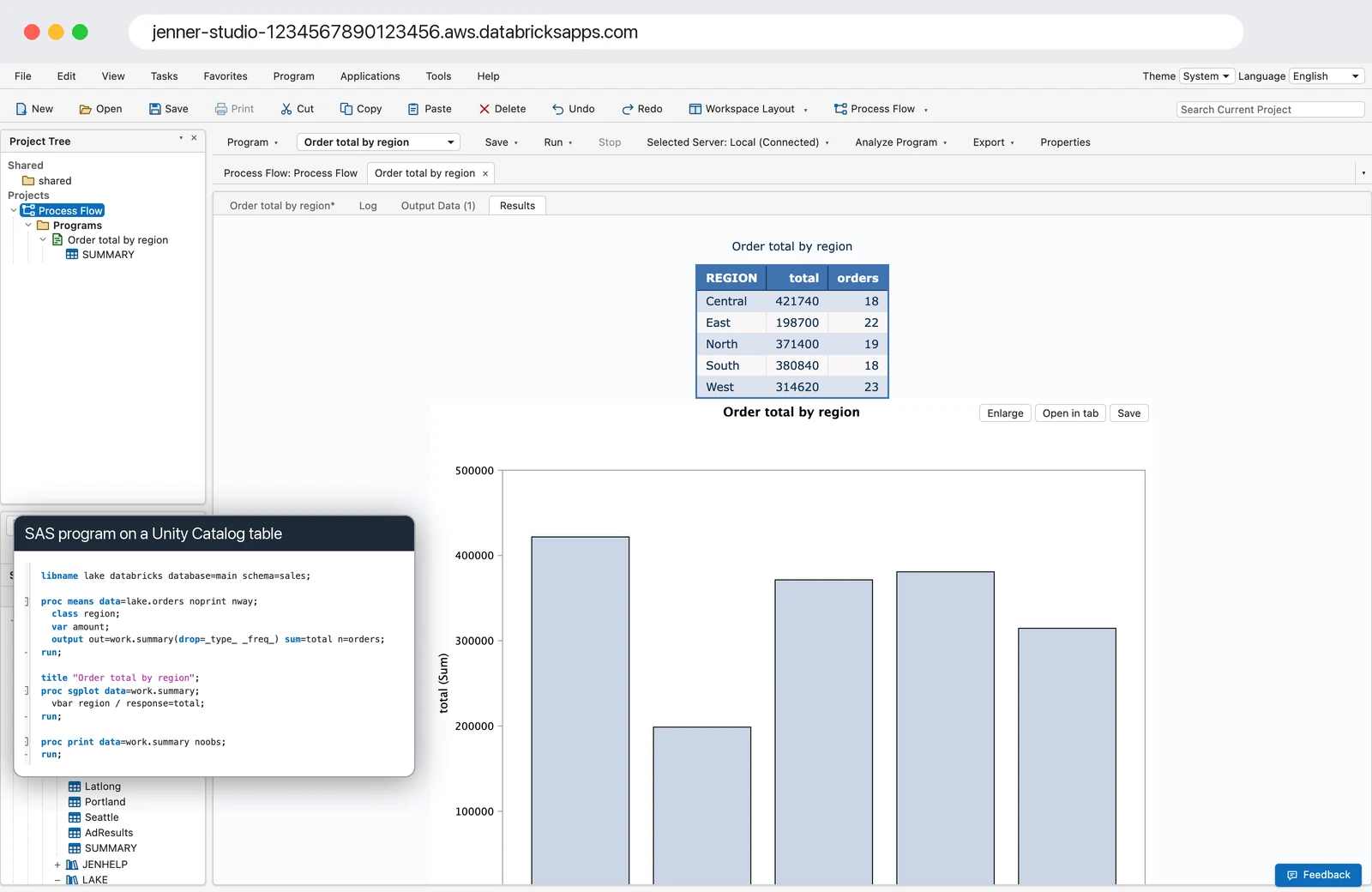
Jenner Studio is a Databricks App. Open it from your workspace and sign in with your Databricks account; there is no second password. Build process flows, write and run programs, and open notebooks, all on your Unity Catalog tables.
An engine of your own
Each person who opens Studio gets an engine of their own, shut inside a folder of their own. It reads and writes tables as that person, so your Unity Catalog permissions apply as they do everywhere else in Databricks.
Your projects are kept
Projects are saved to your private volume, so they are there the next time you open Studio.
Your data stays in your workspace
Jenner runs on your Databricks compute and reads your tables under your Unity Catalog permissions, so your data stays in your workspace.
A private volume for each user
By default each user gets a volume of their own for their WORK library, their JENUSER library and the logs, listings and files of their runs. Only that user, your metastore admins and the owners of the catalog and schema can read it.
A shared folder, if you choose it
An administrator can choose one shared volume with a folder for each user instead. Every Jenner user can then read every other user's files, and the Jenner App says so before the switch.
The Jenner App handles the licence
A workspace administrator installs the Jenner App in Databricks. It shows the licence status, installs and renews the licence key on a volume, and sends a monthly usage report. To buy, the administrator opens the Jenner website from the App and pays by card.
What the App sends to Jenner
Your workspace ID and host, the cloud, the App version, the licence serial number, monthly counts of active users with salted hashes of their identities, and the administrator's email address at checkout. It does not send your tables or your SAS programs.
Jenner Studio is a second App in the same workspace. The Jenner App links to it.
Frequently Asked Questions
Get Jenner for your Databricks workspace
The Jenner listing on Databricks Marketplace is on its way. Ask for early access and we will get back to you.
Request early accessAsk about Jenner on Databricks
Tell us roughly how many SAS programs you run, how often, and which procedures matter most.